

Source Maps
Upload maps from your JavaScript build, then verify a real error to confirm that its minified frames resolve to original source locations.
Build source maps
Generate a separate Source Map v3 file for each JavaScript bundle you want to resolve. Keep the maps from the exact build you deploy, including filenames with content hashes.
For Vite, add this setting to your existing configuration:
// vite.config.js
export default {
  build: {
    sourcemap: 'hidden',
  },
};
Vite's hidden setting generates separate maps without adding a source-map reference comment to the bundle. See Vite's build options.
For webpack, add this setting to your existing configuration:
// webpack.config.js
module.exports = {
  devtool: 'hidden-source-map',
};
This also generates separate maps without reference comments. See webpack's devtool options. These settings do not stop a server from serving .map files; exclude them from public deployment if you want to keep them private, while retaining them for upload.
Match the project, release, and generated URL
Tindra looks up uploaded maps by project, exact release, and normalized generated-file URL. Set a release in your existing SDK initialization and use the same value for the upload:
Sentry.init({
  dsn: 'https://your-key@your-hostname.tindra.sh/your-project-id',
  release: '1.4.2',
});
The URL describes the generated JavaScript file in the stack, not the .map file or its original source file. For example:
| Frame URL | Matching upload URL |
|---|---|
https://app.example.com/assets/app-abc123.js |
~/assets/app-abc123.js |
/assets/app-abc123.js |
~/assets/app-abc123.js |
~/assets/app-abc123.js |
~/assets/app-abc123.js |
Normalization removes the HTTP(S) host but does not strip query strings or fragments. Use the Matching URL shown by verification when uncertain. Because the host is removed, two hosts serving different builds at the same path need distinct releases or projects to avoid collisions.
Upload a map
In Settings > Projects, expand your project and choose Check setup. Open Source maps, then Upload a source map. Enter Release, Generated file URL, and the corresponding .map file. The upload form requires the manage_projects permission. See Project Setup to select an event for Upload and verify.
For CI, create a writable token for the project in Settings > Tokens and use Tindra's project-scoped API. Set TINDRA_API_TOKEN as a CI secret, then replace the example host, project slug, release, bundle URL, and local map path:
curl --fail-with-body \
  'https://your-hostname.tindra.sh/api/projects/your-project-slug/sourcemaps' \
  --header "Authorization: Bearer $TINDRA_API_TOKEN" \
  --form-string 'release=1.4.2' \
  --form-string 'url=~/assets/app-abc123.js' \
  --form 'file=@./dist/assets/app-abc123.js.map'
Upload each bundle's map separately. Uploading again with the same project, release, and URL replaces that map. Read-only tokens cannot upload, and writable tokens are limited to their own project. The token is a server-side deployment credential; keep it out of browser bundles. See API Tokens.
Use this endpoint for Tindra uploads. Sentry CLI release-file uploads and Sentry bundler-plugin artifact uploads are not supported upload routes on this server.
Upload limits
Each map can be at most 10 MiB, and the complete multipart request can be at most 11 MiB. Oversized uploads return HTTP 413. Invalid maps, including unsupported source-map versions or malformed mappings, return HTTP 400. Missing release, URL, or file fields also return HTTP 400.
Source-map files are stored beneath DATA_DIR, with metadata in Postgres. Self-hosted deployments must keep that directory writable and persistent. See Backup when moving or restoring an instance.
Verify against an event
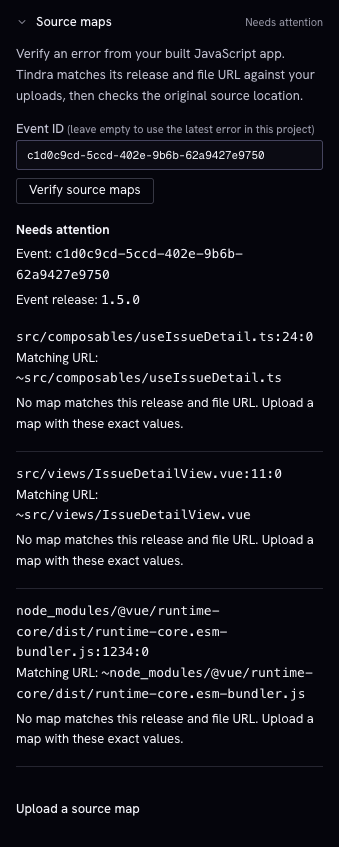
Send a real exception from the deployed build with its release configured. Open the project's setup page, expand Source maps, and enter the Tindra event ID from the issue link's event_id parameter. Choose Verify source maps. Leaving the ID empty selects the latest error in that project, which might come from a different build.
Verification checks the stored event's exception frames against uploaded maps. It reports each generated position, normalized matching URL, and resolved source location. It examines at most 40 eligible frames and indicates when the result is truncated.
| Result | Meaning and action |
|---|---|
| Verified | All eligible frames resolved, and the frame list was not truncated. |
| Some frames resolved | At least one frame resolved, but others need attention or the frame limit was reached. Review the individual results. |
| Needs attention | No checked frame resolved. Use the frame's explanation to correct the upload or event configuration. |
| Missing release | Configure the release in the SDK and send a new error. Uploading a map cannot add a release to an existing event. |
| No matching map | Upload the exact build's map for this project, release, and matching URL. |
| Map unreadable | Check that the stored map file is available and valid, then upload it again. |
| No mapping at this position | Upload the map from the same build as the event; check the generated line and column. |
| No stack frames | Send an exception with file and line information from the built application. A plain message may have no eligible frames. |
| Not applicable | The event's platform does not use this JavaScript/Node verification path. |
After correcting an upload, verify the same event again. The setup form's Upload and verify does this for you. If the event has expired or belongs to another project, select a retained event from the project you are checking.
A map can resolve an original filename and line without containing source text. Include sourcesContent in your maps if you also want original code context.
Public files and fallback context
Tindra verifies uploaded maps; it does not discover and download maps from sourceMappingURL comments. Serving .map files publicly therefore does not replace the upload step.
When no uploaded mapping resolves a frame, the event viewer may fetch the generated JavaScript file to show nearby code. That fallback is generated-file context and does not establish that the original source location was resolved. Use the verification result to check mapping success.
Fetching generated code from private hosts
Fallback source enrichment blocks private, loopback, link-local, and unspecified destinations, including hostnames resolving to those addresses and redirects to them. Neither WEBHOOK_ALLOW_PRIVATE_IPS nor UPTIME_ALLOW_PRIVATE_IPS enables private source fetching. Upload the matching map with sourcesContent to provide original code context without fetching a private generated file.